


Get quote
Get Free Consultation!
We are ready to answer right now! free consultation.

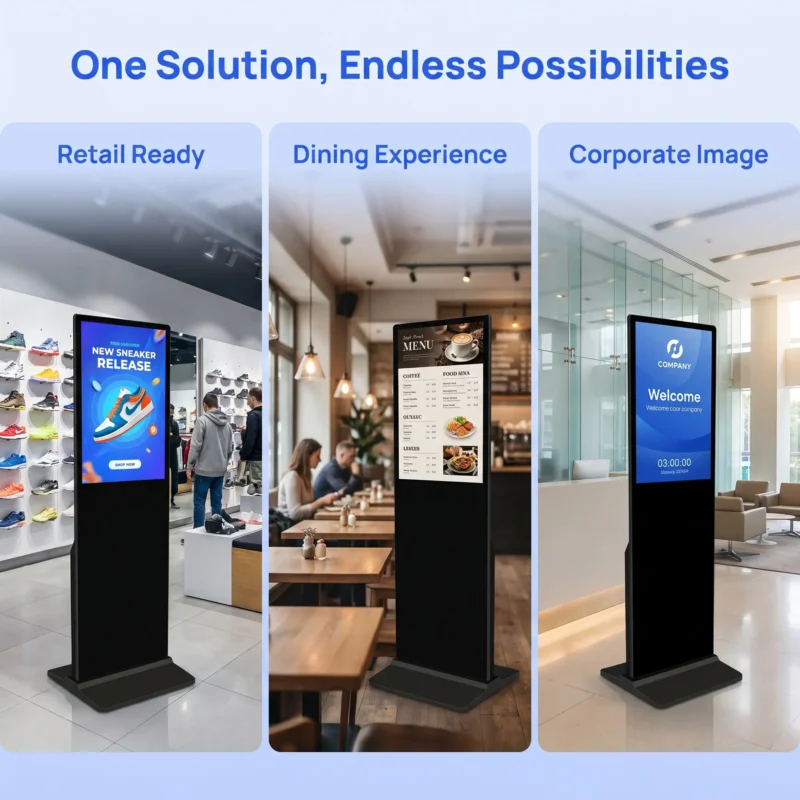
Before ordering a freestanding display, draw the space it needs to operate and be serviced—not just the rectangle of its screen. A floor standing digital signage manufacturer should provide the current base, enclosure and connection information for the exact model. The customer and qualified installer can then assess the proposed location, support arrangement and cable route without guessing from a front-view photograph.
LINGHUFOX offers several floor-standing signage sizes for retail, reception and public information applications. Choosing among them involves more than finding a visible position. The installation also needs room for the base, permitted access to service areas and an appropriate route for power and network connections. This guide focuses on those practical boundaries and the handover that keeps them intact after opening day.
Request a drawing that includes the base and any parts projecting beyond the display enclosure. A screen-width measurement does not show the floor area occupied by the complete unit. Likewise, a slim body dimension should not be treated as the depth of the base. The current drawing should identify the supplied model and configuration.
The 32-inch LINGHUFOX floor-standing display is a compact panel format with a Full HD specification. It is not a small wall screen placed on the floor. Its listed shipping carton and gross weight illustrate that the freestanding enclosure is a separate physical system. Obtain its installed dimensions and support requirements directly from the manufacturer.
The 55-inch model describes a slim frame, freestanding base and indoor commercial use. Those features help identify its intended format, but they do not establish a resistance to every push, impact or floor condition. Ask what installation or securing arrangement the manufacturer requires for the proposed site.
Have the qualified installer assess the actual supporting surface and complete display assembly. The assessment should consider the manufacturer’s instructions and the site’s operating conditions. This article does not specify anchors, ballast, fastening methods or a safe load for an unidentified floor. Those decisions should not be improvised from the unit’s appearance or weight.
If the site requires a removable arrangement, explain that before the quotation is finalized. Ask whether the proposed model and support system permit the intended use and how relocation is to be performed. Do not interpret the phrase “floor-standing” as a statement that the equipment is designed for frequent movement or can be placed without any site-specific review.
A freestanding sign can attract viewers who pause, turn or gather around it. Mark that expected activity on the plan. The equipment itself may fit beside an entrance while the viewing position creates a conflict with a queue or doorway. The site owner should assess circulation with the display in its normal operating position.
The 43-inch floor-standing display describes optional touch interaction. An interactive configuration needs a user position rather than only a passing viewing angle. Confirm whether touch is actually included and which application will run. Do not plan a self-service interaction around a non-touch quotation or assume every advertised touch option includes the application.
For non-interactive promotion, evaluate the message from the directions people approach. A screen can be prominent from the main aisle but hidden from a service queue. Use the intended content during the site review, not only a blank placement outline. Keep the review focused on the job the display is meant to perform.
The site’s circulation, emergency access and accessibility requirements need review by the responsible professionals. Do not derive a universal clearance from this buying guide. Give them the current equipment drawing and intended user activity so they can assess the complete arrangement. The supplier should provide product information without pretending to approve a building it has not evaluated.
The HSE guidance on workplace slip and trip hazards identifies trailing cables and obstructed walkways as problems to address. Although that page discusses production areas, the basic hazard prompts are useful for a signage site review. They do not replace the requirements or professional assessment applicable to a particular retail or hospitality location.
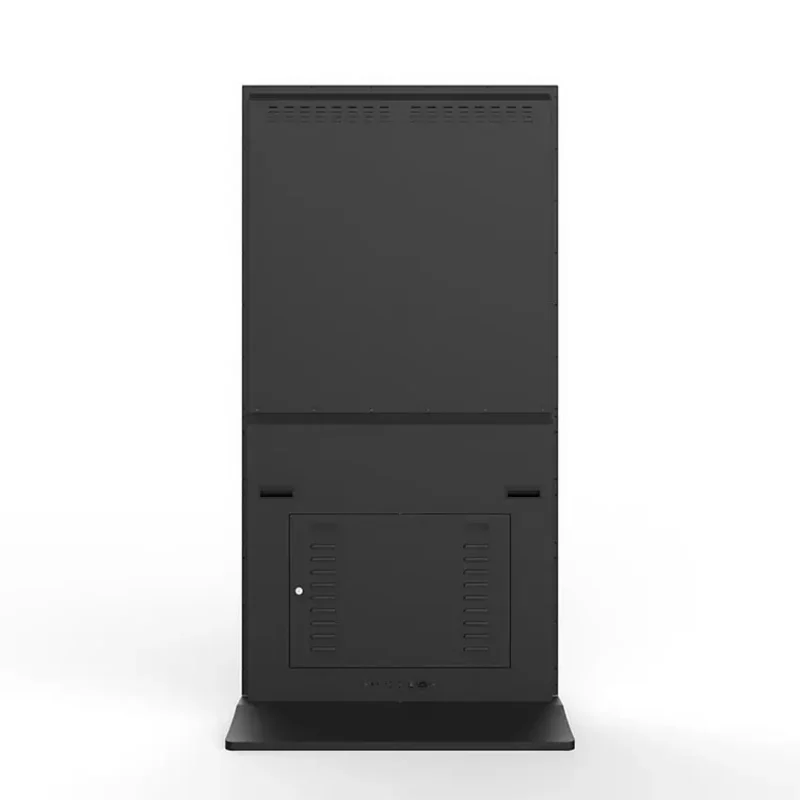
Ask how the proposed display is accessed for permitted maintenance and repair. Identify service panels, connectors and any components that require removal. The final location should allow the authorized technician to follow those instructions. A unit placed tightly against a wall or decorative fixture may be difficult to service even though its screen remains fully visible.
The 55-inch floor-standing description includes built-in cooling. Keep the manufacturer’s ventilation requirements separate from the desire to hide the rear of the display. Do not place decorative panels, stored materials or promotional leaflets over openings. Ask the supplier to review any proposed surrounding structure against the exact model.
The 75-inch floor-standing model provides a larger message surface for lobbies and reception areas. Its service route should be considered independently from a smaller display. A larger cabinet can require a different removal or handling plan, even when the content workflow is similar.
| Zone | What belongs in the plan | Who confirms it |
|---|---|---|
| Equipment | Base, enclosure, attached accessories and approved support | Manufacturer and qualified installer |
| Viewer or user | Approach, stopping position and intended interaction | Site owner and relevant room planners |
| Service | Access panels, connection work and permitted removal route | Authorized service provider |
Mark the reserved area in the operating instructions. The arrangement can deteriorate after installation when staff place boxes, furniture or temporary displays around the unit. Assign someone at the site to recognize changes that interfere with access or ventilation and route them for review. A correct installation drawing is useful only while the actual location continues to follow it.
Keep ordinary care separate from internal repair. Request model-specific cleaning and maintenance instructions. Staff should know which tasks are permitted and when to stop and contact authorized support. This guide does not recommend opening a live cabinet, changing internal wiring or using an unapproved cleaning product on the display surface.
Identify where power and network connections originate and how they reach the display. Ask the qualified installer to design the route according to the relevant requirements. Do not allow a temporary demonstration cable to become the undocumented permanent installation. The route should remain suitable when doors open, cleaners work and customers gather nearby.
The 32-inch floor-standing specification lists Ethernet and wireless connectivity options. Confirm the exact configuration and the site’s approved network method. Wireless data can reduce one cable dependency, but it does not establish that the whole display is cordless or that every location has adequate connectivity. Keep power and data requirements distinct.
Ask which ports are needed during normal operation and which are used for service. A local publishing method may need access to a removable medium, while a network-managed installation may have a different routine. The retail display-range guide helps connect the format to its role; the connection plan makes that role practical at the site.
Give the site a diagram with the relevant connection identities and support contact. Keep network credentials in the organization’s authorized management process, not on a public-facing label. A technician should be able to identify the route without exposing account information to visitors or ordinary users.
When a connection changes, update the diagram and rerun the affected playback check. A new network socket, adapter or player setting can alter the accepted workflow even though the display has not moved. Record the change so that later troubleshooting starts from the installed arrangement rather than the original demonstration.
Decide whether the display is intended to stay in one place or move between approved locations. If movement is required, obtain the manufacturer’s instructions for the exact assembly and have the site establish an appropriate handling process. Do not assume the presence of a base means the screen can be pushed, tilted or moved while connected.
Review the destination before moving the equipment. The new position may have a different floor, cable route, daylight exposure or viewing pattern. Repeat the relevant site checks and update the location record. A display suitable for one indoor reception point should not be moved outside merely because a promotion would be more visible there.
For temporary storage, confirm the permitted conditions and protection method. Keep accessories and identifiers connected to the unit so it can return to service in the approved configuration. A stored display should not become a source of unidentified cables or parts that are borrowed for other equipment and never replaced.
The retail-entrance selection guide addresses how the display serves a busy location. Revisit that purpose after a move. A safe, serviceable position that no longer reaches the intended audience may require a different message or a different approved placement, rather than an unplanned adjustment by local staff.
Record who can authorize a move or an added accessory. A brochure holder, decorative wrap or new external device can affect the complete assembly. Send proposed changes to the relevant supplier and installer for review instead of assuming that small additions are outside the installation scope.
Before opening the location, compare the installed unit with the approved drawing and connection plan. Confirm the equipment identity, support arrangement, accessible service areas and intended content. Have the responsible professionals close their own parts of the acceptance record. A successful playback test does not substitute for installation approval.
Keep the current drawings, model and serial information, connection diagram and permitted care instructions together. Add the location and the people responsible for operation and service. LINGHUFOX’s project-support information can guide the supplier discussion, but the actual responsibilities and response arrangements should be confirmed for the order.
Schedule a review when the surrounding layout changes. A new queue barrier, seasonal display or furniture arrangement can affect the viewer and service zones. The equipment may be unchanged while the installation context is no longer the one that was accepted. Keeping that distinction visible helps the business use the display without relying on assumptions from opening day.
No. The exact base, supporting surface, securing requirements and site activity still need assessment. Obtain the manufacturer’s current instructions and involve a qualified installer. The term describes a format, not a universal approval for every floor, pedestrian area or operating condition.
Only through the process approved for the actual equipment and site. Confirm handling instructions, disconnect requirements and the suitability of the new location. Update the connection and location records afterward. A campaign change does not by itself establish that the display is designed for frequent movement or outdoor use.
A model-specific drawing showing the full base and enclosure, approved support arrangement, connections and service access gives the site team a practical starting point. Add the expected viewer or user position and circulation review. The complete footprint is more informative than the panel diagonal or a front-view product image alone.
