


Get quote
Get Free Consultation!
We are ready to answer right now! free consultation.

The difficult part of building a display business is not finding more screen sizes. It is deciding which products your team can demonstrate, install and support without turning every sale into a new engineering exercise. A digital signage supplier should help you separate repeatable retail installations from specialist projects. For a distributor serving shops and cafés, start with fixed indoor displays, then add wearable or rotating formats only when you can explain the different operating requirements. Separate the opening range into repeatable indoor products, application demonstration units and configured specialist projects.
LINGHUFOX’s range makes that distinction practical: the 32-inch floor-standing display offers a freestanding promotional format; the 55-inch wall-mounted display addresses fixed indoor menus and information; and more specialized products serve narrow fixtures, moving campaigns or direct customer interaction. A useful distribution plan does not give every one of these products the same inventory status.
Separate the range into core stock, demonstration stock and project-only supply. These are decisions for your distribution business, not statements that a manufacturer already holds particular models in inventory. The aim is to match your commitment to the repeatability of the customer’s requirement. A clearly specified indoor promotion screen may justify a different commitment from a custom stretched display that must fit one shopfitting detail.
A potential core product should have a configuration your salesperson can explain and your installer can recognize. For the 32-inch floor-standing model, that means agreeing the included player, content-publishing route, power arrangement and cabinet specification. Do not define the stock item only as a 32-inch screen; otherwise your team may discover configuration differences after promising the same product to several buyers.
A rotating touchscreen belongs in a demonstration lane when customers need to try the interaction before ordering. Its value in your showroom is the ability to prove a particular workflow, not simply to show another video loop. Keep the application and orientation settings used in the demonstration identifiable, so the eventual order can reproduce the experience the customer approved.
A bar-format screen must fit a defined opening and a wearable screen must suit a particular campaign. Neither is automatically a poor stock choice, but both require information that an ordinary screen-size request may omit. Treat them as configured opportunities until you understand your own customers’ repeat demand and your capacity to support their use.
Imagine a new distributor whose customers are independent cafés and small fashion shops. The cafés want staff to change prices and remove unavailable items; the shops want promotional content visible from an approach route. The distributor should prepare two demonstrations rather than present a catalogue of diagonal sizes. One demonstration should follow a menu change. The other should show how an entrance promotion reads from the intended viewing position.
The 32-inch floor-standing listing specifies Full HD 1920 × 1080, Android 9.0, scheduled playback, and Wi-Fi and Ethernet connectivity. Those facts give the distributor a concrete starting configuration to discuss. Test the actual publishing method on that build before making it part of a standard package. The operating system name alone does not settle account ownership, remote access, application compatibility or the availability of future updates.
The 55-inch wall-mounted format solves a different space problem: it moves the screen away from the sales floor. Its listed 300-nit brightness is presented for indoor information and promotions. A distributor can position it as an indoor menu or information candidate, while requiring a lighting check for reflective windows or unusually bright locations. Selling it as a universal shop-window screen would go beyond the documented application. Professional ranges such as PPDS’s digital signage catalogue identify brightness and operating schedules separately. Request both for your selected LINGHUFOX configuration; another manufacturer’s rating cannot fill a gap in the quotation.
Keep the commercial offer clear about installation. A freestanding product still needs an appropriate position and cable route; a wall-mounted product needs an agreed bracket and a suitable supporting structure. A salesperson should not describe either as installation-free. Include the information required from the customer before the installer can confirm that the proposed location is suitable.
For a small distributor, this discipline also makes support more manageable. If the standard 32-inch offer uses one approved content process, staff can learn that process properly. Introducing different player configurations without identifying them may create more support work than the extra catalogue breadth is worth. Expand the range when there is a reason connected to customer requirements, not merely because another variation is available.
The 32-inch floor-standing model’s published packing table lists a carton of 1870 × 210 × 645 mm and a gross weight of 50 kg. These are figures for the listed configuration, to be reconfirmed for the final offer. They show why a distributor should not categorize transport and receiving effort by screen diagonal alone. The display surface may be relatively compact, while its full-height cabinet still needs a suitable handling and storage arrangement.
Before making this unit a stocked product, compare its confirmed packed dimensions with your own storage space and onward delivery route. Ask whether the base travels attached or separately and how the associated parts are identified. A sale to an independent retailer may involve a different receiving arrangement from delivery to a contractor’s warehouse. Quote the service you can actually provide rather than assuming that any destination can receive the same packaged cabinet in the same way.
Keep the supplier’s approved packing description with your internal stock record. If a later order changes the cabinet finish, base or accessory package, check whether that changes the packed item as well. This is especially relevant when your sales team advertises one standard delivery service for the 32-inch totem. The customer should not discover an unplanned handling requirement only when the carrier arrives.
The 18.5-inch stretched LCD display is a useful example of a product that should not be sold as “a smaller advertising screen.” It is intended for narrow messaging positions such as shelves, counters and queue information. Its shape changes both the installation conversation and the amount of information that can be displayed comfortably.
A shopfitting contractor considering this format should provide the available opening, the surrounding materials and the intended message. Request the active area, native pixel dimensions and mounting details for the offered unit before committing to the fixture design. Without those details, the distributor cannot know whether an existing piece of artwork can be adapted or whether the message needs a completely different composition.
Use a narrow, realistic example in the demonstration: one promotion, one direction or a short queue instruction. Avoid a miniature version of the full café menu simply to fill the screen. The product listing describes remote scheduling and centralized content management; establish the actual software arrangement and show how a specific location receives its assigned message. The point of the demonstration is to answer the contractor’s installation and content questions, not to imply that every management service is included.
A reseller that already supplies fixed screens may receive an event brief asking for advertising that moves with a promotion team. The 21.5-inch LCD backpack display is relevant to that request: its listing includes Full HD 1920 × 1080, Android 11.0, Wi-Fi, 500 cd/m² brightness and a 12 V, 20,000 mAh battery. Those details establish a wearable, battery-powered format. They do not establish a particular operating duration or weather rating.
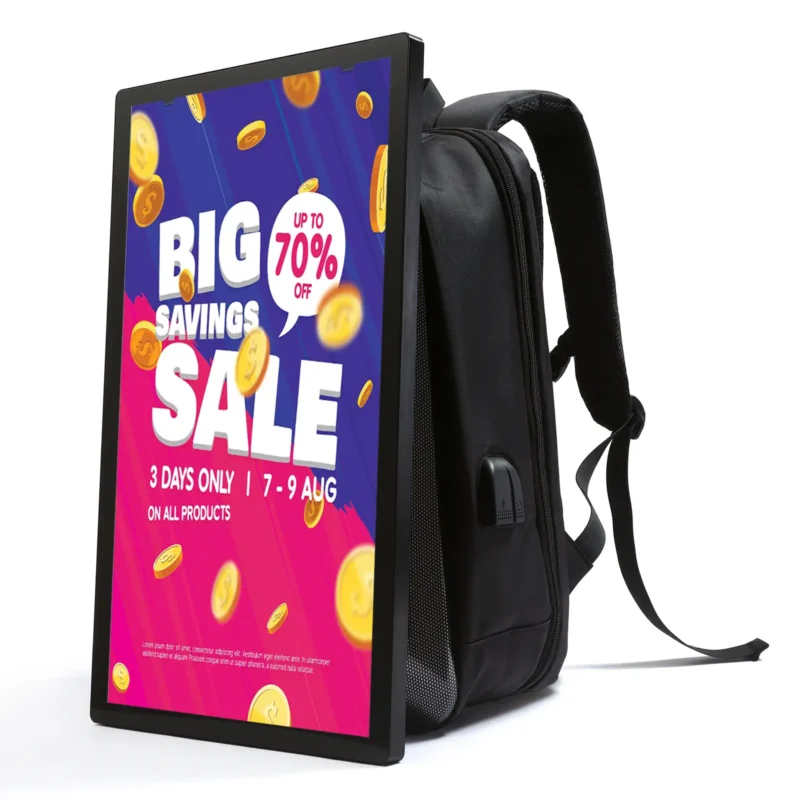
Before proposing it for an event, find out how the team will charge the units, how content will be loaded and where the equipment will be kept between sessions. Arrange a trial of the actual carrying setup. Ask for the complete carried weight with the offered battery and accessories rather than relying on a single weight line whose scope has not been confirmed. The person using the display needs to assess the assembled kit, not an unpacked screen on a desk.
Battery capacity should remain a battery specification in your sales material. Do not translate it into an all-day runtime promise without a measured result for the selected brightness, content and battery configuration. Likewise, a campaign outdoors does not make the screen weatherproof. Obtain the supplier’s stated environmental limits and develop a suitable operating plan with the event organizer. Where a requirement is unsupported, choose another placement or decline that part of the brief.
This is why wearable units can be useful as project-led products even in a broad signage business. The event buyer is purchasing a temporary operating arrangement as well as a screen. Your support team may need to explain charging, storage and media preparation rather than wall brackets or permanent network cabling. Price and scope the offer around that actual work.
The 21.5-inch rotatable touch smart display offers Android 12, 4 GB RAM, 64 GB storage and ten-point capacitive touch. It also has a movable base and orientation adjustment. A distributor can use it to explore staff-assisted product selection, a small hospitality presentation or an interactive showroom workflow. It should not be described as a replacement for every fixed commercial screen.
Its published Type-C description specifically excludes charging. That is a useful example of why demonstration staff should read the connection details instead of assuming that all USB-C functions are present. Agree the power arrangement and any peripheral connections before using the display in front of a customer. A demonstration that depends on an unsupported charging assumption can undermine confidence in an otherwise suitable product.
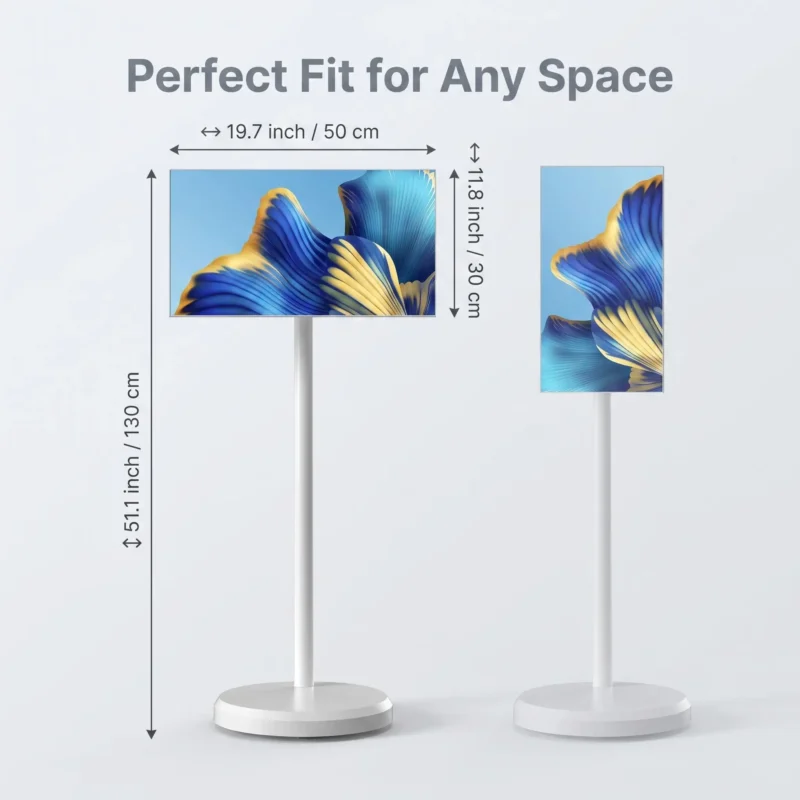
A useful customer session can follow three actions:
Record any application limitation that appears during this session. It may call for an interface change rather than a different screen. A supplier’s hardware specification can establish the operating platform and touch capability, but it cannot answer every question about third-party software. Your distributor offer is stronger when those responsibilities are separated instead of hidden inside a vague “smart display” promise.
The LINGHUFOX service description includes technical communication, OEM/ODM customization, export coordination and after-sales support. Turn those broad services into a responsibility agreement for your chosen range. Who confirms the 32-inch player’s configuration? Who supplies the wall-display bracket information? Who demonstrates the rotating unit with the required application? Which information must your own team collect before a specialist order can proceed?
Hardware supply and fleet operation are distinct activities. BrightSign’s management documentation treats managing and monitoring players as its own part of a deployment. The practical implication for a distributor is to define the publishing and monitoring responsibilities in the offer. This does not imply that LINGHUFOX includes BrightSign hardware or any particular management platform.
For fixed displays, decide whether your team will set up customer content accounts or simply deliver hardware ready for the customer’s integrator. For backpack screens, establish the charging and content-loading instructions that accompany each kit. For the rotating touchscreen, identify the approved application and the limits of any software support. These are different handovers because the products do different jobs.
Begin with the range your team can explain accurately. A standard indoor display offer, one convincing touchscreen demonstration and a clearly defined route for specialist projects can be more coherent than stocking every format immediately. Add the next product when you can show the customer why it belongs in their space—and tell your own support team exactly what has been sold.
Model notes checked on October 19, 2026: specifications are drawn from the linked product listings. Stock categories and customer scenarios are suggested planning choices. They do not report actual supplier inventory, completed trials or event operating hours.
